



Content


In marketing, it's rare for all the data you need to live in one place. Contacts are in a CRM or Google Sheets, orders are in an accounting system, communications are in an ESP, and analytics are in a BI tool.
A marketing team works with a range of marketing management systems: a CRM, communication services, analytics. Then there's the website, messengers, forms, and chatbots.
Moving data from one system to another almost always creates a few more tasks: validating the data, removing duplicates, changing the format, defining the segment, launching the communication.
This is where no-code and low-code marketing automation tools come in handy for marketing teams — n8n and Make in particular. They create an intermediate layer between services that doesn't just pass data along but processes it according to set logic.
In this Promodo article, our email marketing specialists will show how this works in our projects: from automatic contact import to Viber in Klaviyo, an NPS dashboard, and a personalized consultation in Telegram.
Many marketing processes include operations that seem simple until they become regular.
Marketing automation is, first and foremost, a way to hand repetitive operations over to systems and services instead of performing them manually. Take working with new contacts, for example: the data has to be prepared for upload to the ESP, checked for accuracy, and verified to make sure there are no duplicates in the database.
If you do this once a month, it's not a big deal. But when such tasks repeat daily or weekly, they take the team's time and create extra room for mistakes.
That's why it's important not just to look for processes that can be automated, but to identify those where automation will genuinely make the marketing team's work easier.
Let's start with the simplest case — regularly transferring contacts from Google Sheets to eSputnik.
Up-to-date contacts were stored in a spreadsheet. Before each upload to eSputnik, a marketer had to:
We added n8n between Google Sheets and eSputnik.
n8n is a low-code platform for automating processes and integrating different services. It lets you build workflows (automated scenarios) that don't just pass data between systems but also process it according to set conditions.
The workflow runs on its own on a schedule. It picks up new records from the spreadsheet, validates them, normalizes phone numbers, removes duplicates, and sends the contacts through the eSputnik API.
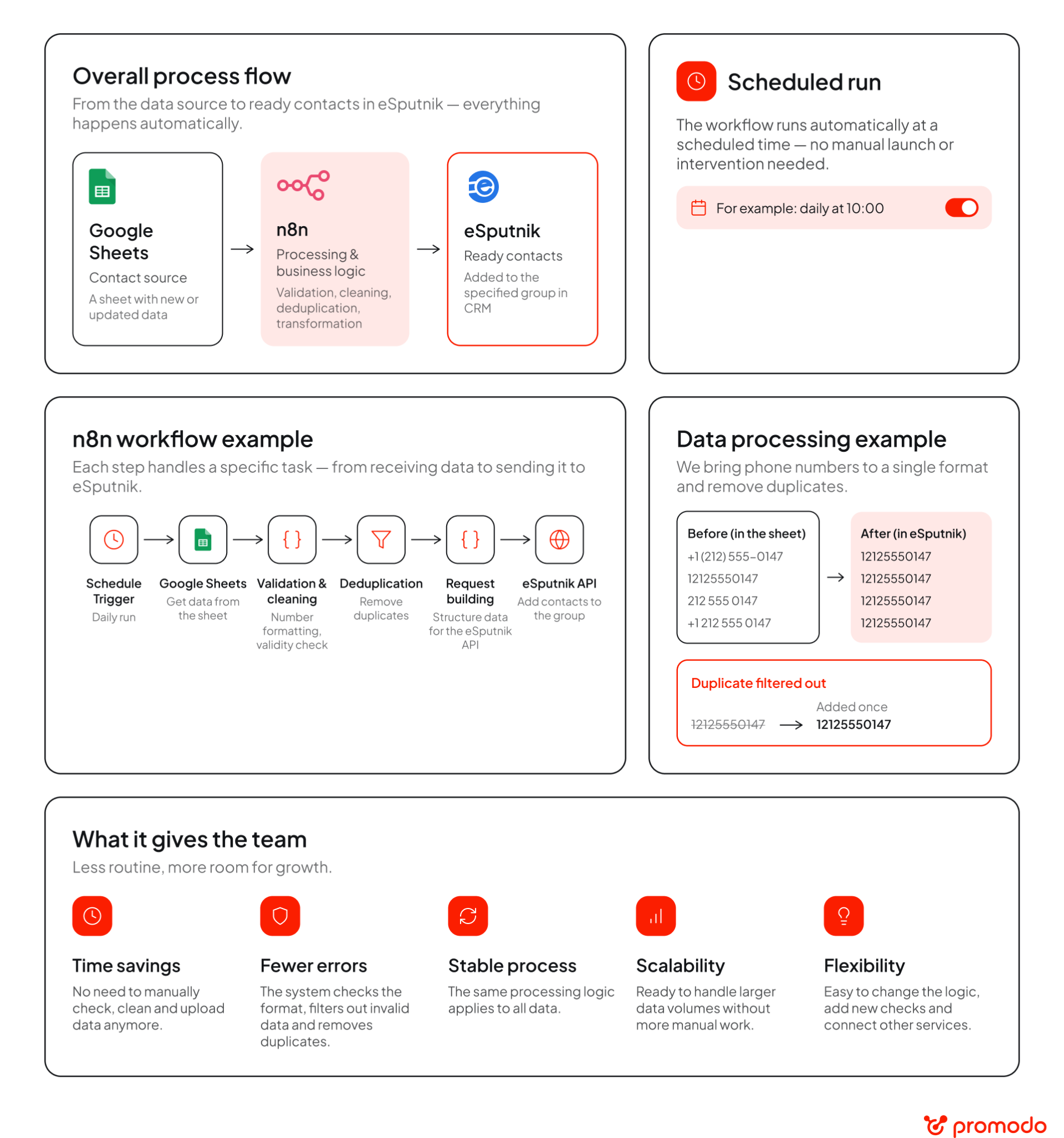
Technical note: phone numbers in the spreadsheet can be written in different ways: +1 (415) 555-0132, 4155550132, or 415-555-0132.
The first step in the workflow is to validate the numbers and convert them to a single format by removing spaces, hyphens, parentheses, and other extra characters. This way, the system recognizes identical numbers even if they were originally written differently.
What's important is that n8n lets you set up additional data processing rules. For example, if you later need to validate another field or change the phone number format, you just update the relevant workflow. You don't need to change the spreadsheet itself or the CRM settings.
A regular manual operation has become an automated process. Now the team spends less time preparing contacts, the processing logic is the same for every run, and the risk of errors from manual editing is lower.
A CRM stores information that can trigger marketing and service communications: new contacts, purchases, profile changes, and order status changes.
For an ESP to use this data, it has to be passed from one system to another. For example, after an order status changes, the customer should receive the corresponding service message, and after a new purchase, their profile in the marketing system should be updated.
We set up an integration between the CRM and the ESP via n8n.
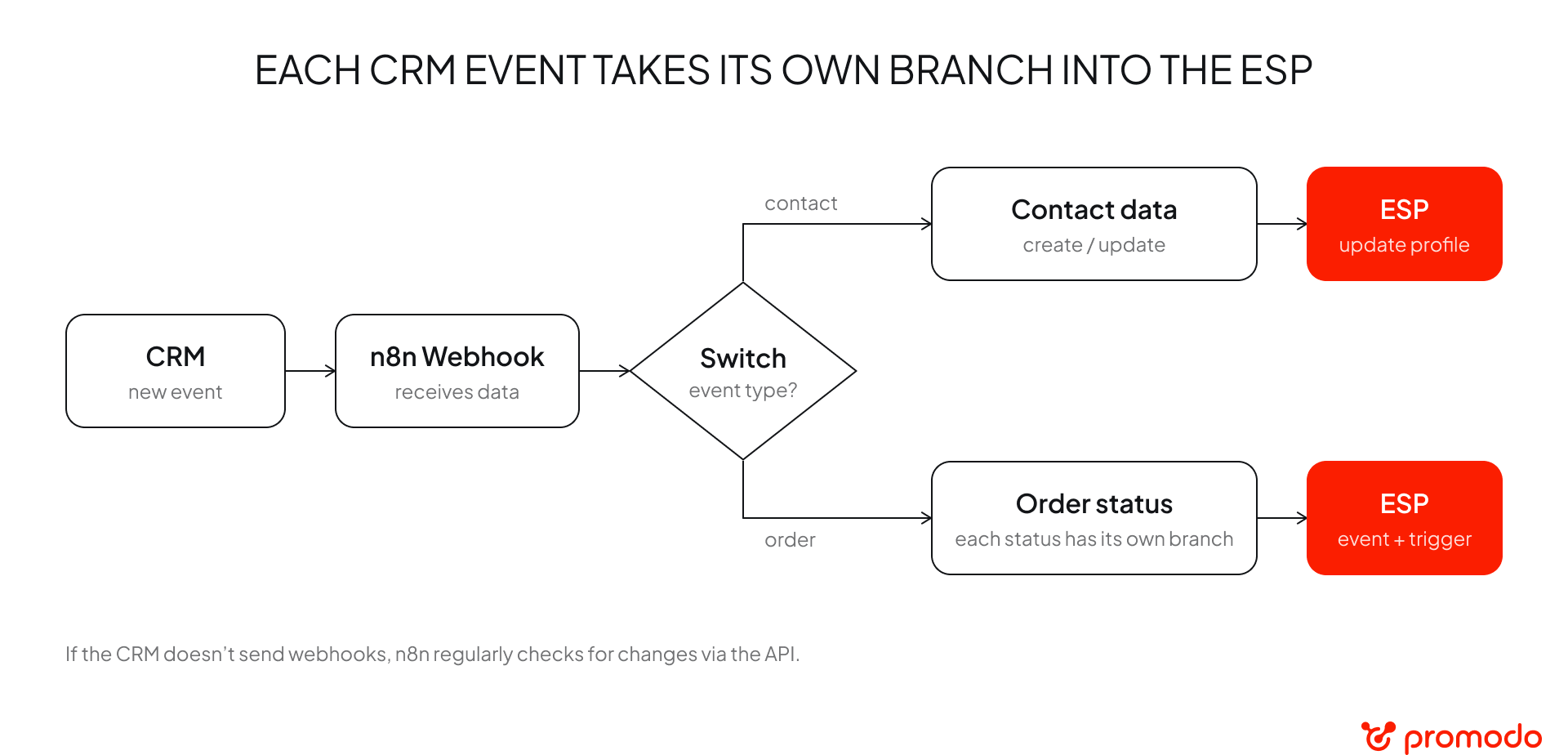
When a relevant event occurs in the CRM, it sends a webhook to n8n. This can be the creation of a new contact, a profile update, an order status change, or a new purchase.
n8n receives the information, checks whether the contact already exists, converts the data to the ESP's format, and passes it on. For order statuses, the system routes them to the appropriate branches of the workflow. Based on these events, the ESP launches the necessary triggered communications.
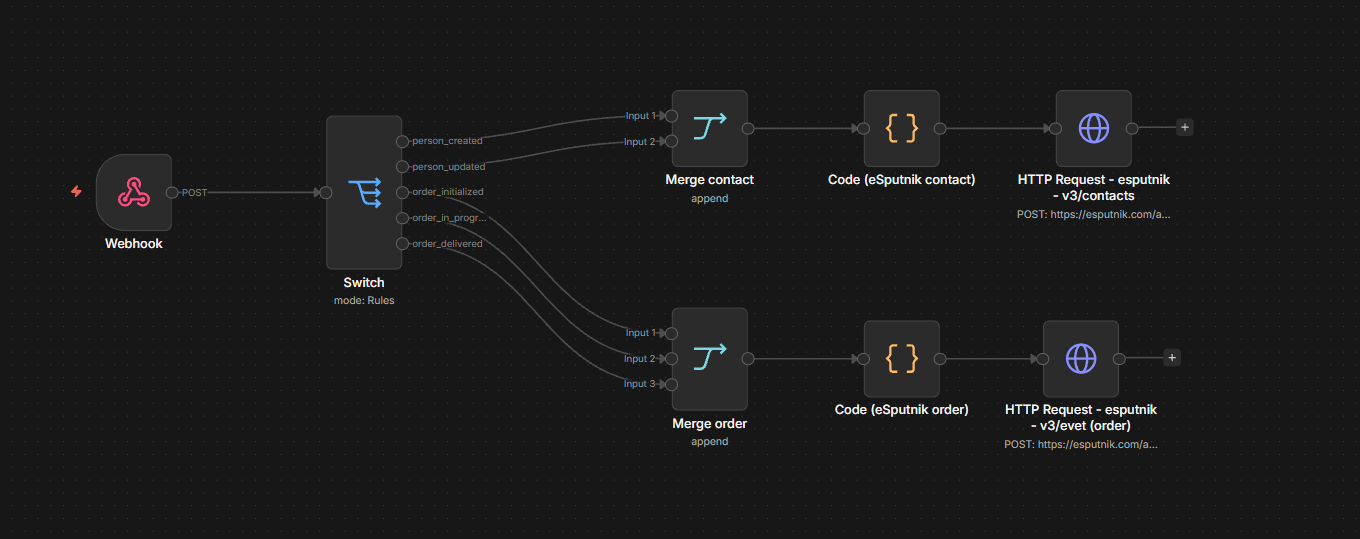
Technical note: the webhook can carry parameters such as eventTypeKey, order_status, order_id, category_product, currency, email, phone, and others. A Switch/IF block routes statuses and substatuses to separate branches, Set defines the event name and data structure, and HTTP Request or a ready-made ESP node writes the event to the marketing system.
If the CRM doesn't support sending webhooks, n8n can check for changes via the API on a regular basis.
This is especially useful for companies that want to use CRM data in retention marketing but don't have the resources for dedicated backend development. The approach works with various systems: Pipedrive, HubSpot, Salesforce, KeyCRM, or a custom CRM on one side; eSputnik, Klaviyo, Brevo, or Reteno on the other.

Klaviyo has no native ability to send Viber messages. But that doesn't mean the channel can't be used in automated communications.
We used Make as an intermediary between Klaviyo and TurboSMS.
Klaviyo sends the user data and message type via webhook. Make receives this information and, if needed, supplements it with other data — for example, a personal promo code or details about a product that is back in stock. Then it composes the message and sends a request to TurboSMS, which delivers it via Viber.
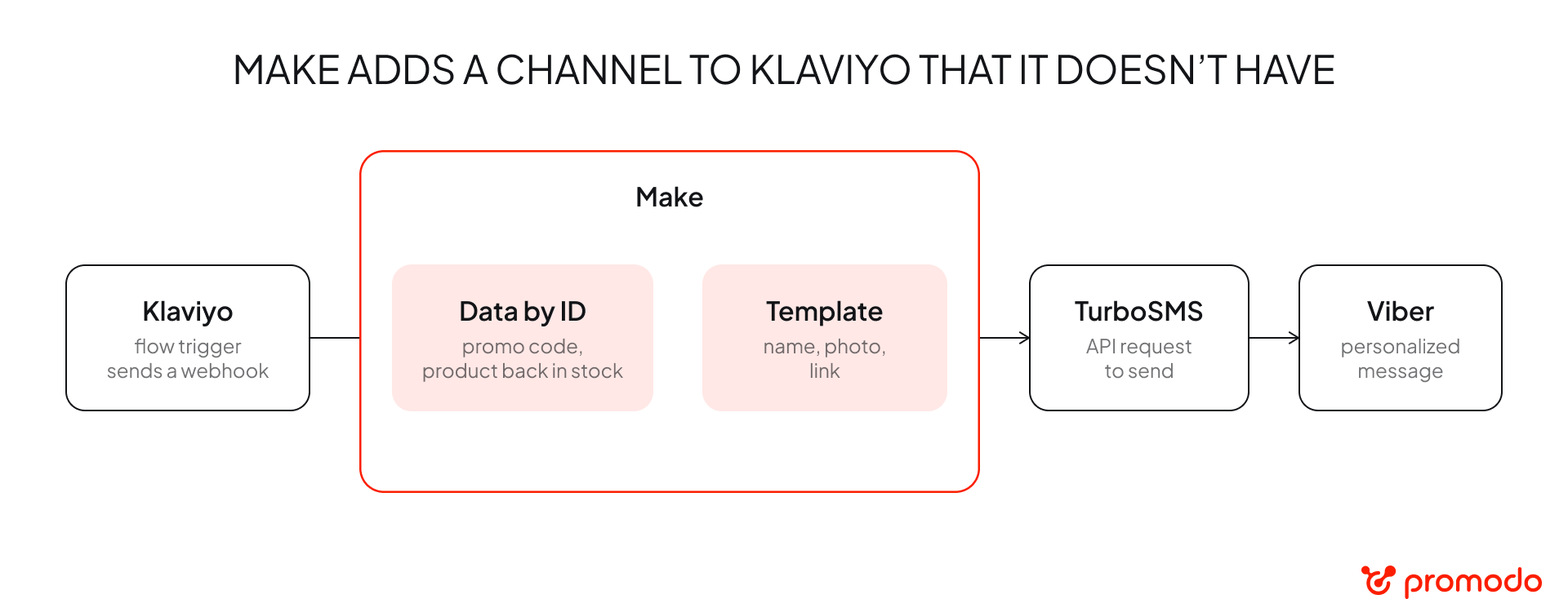
The implementation in Make took a few hours, whereas custom development would have taken anywhere from several days to several weeks. Triggered Viber messages became another revenue source within the already set-up Klaviyo flows.
In other words, here no-code solves not an abstract "technical problem" but a very real business one: it lets you quickly add another channel to existing marketing flows.
You can use this same Make setup to work with data from different marketplaces.
If a business sells on both Shopify and Etsy, Etsy customer data can't be used directly for email campaigns. So we created a landing page in Klaviyo that offers visitors the option to subscribe to communications. After a person subscribes, Make looks up their purchase information in the business's database by email and enriches the user's profile in Klaviyo.
The most interesting scenario is a personalized consultation in Telegram. Here, n8n no longer just passes data between two systems; it coordinates an entire process.
A regular chatbot can offer ready-made answers or walk the user through a predefined scenario. But that's not enough for a personal recommendation: you need to understand the person's needs, ask clarifying questions, take their answers into account, and find suitable products.
We built a personalized consultation in Telegram using n8n, AI, and Google Sheets.
Telegram became the interface for talking to the user, Google Sheets became the up-to-date product catalog, and AI became the tool for conducting the dialogue. n8n coordinates all the components and manages the sequence of actions.
The consultation is built as a sequential dialogue: the bot asks one question, receives an answer, and determines whether it has enough information to search for products. If not, it asks the next question. If so, it queries the catalog and looks for suitable options.
This means the number of questions depends on the user's needs, not on a predefined scenario.
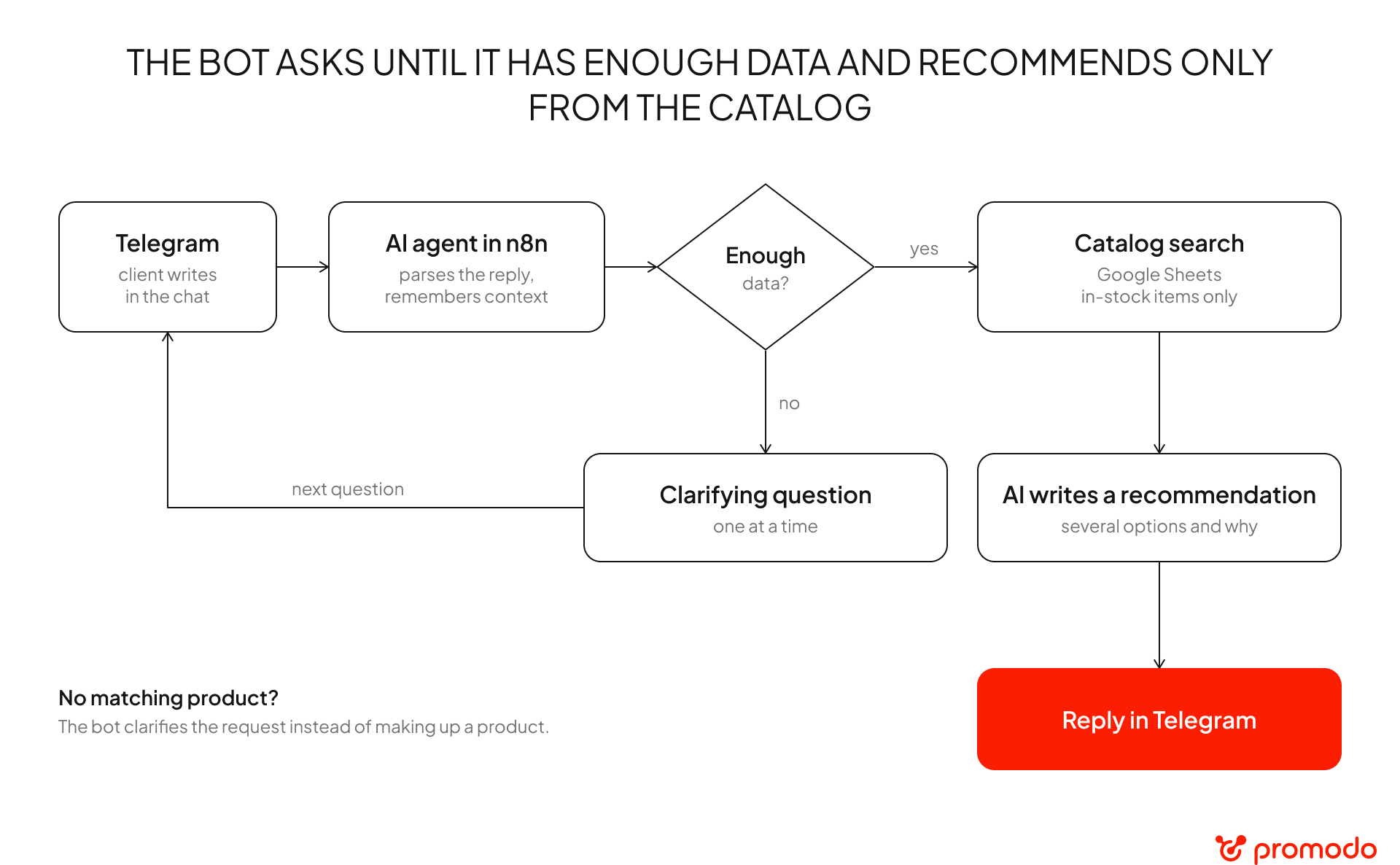
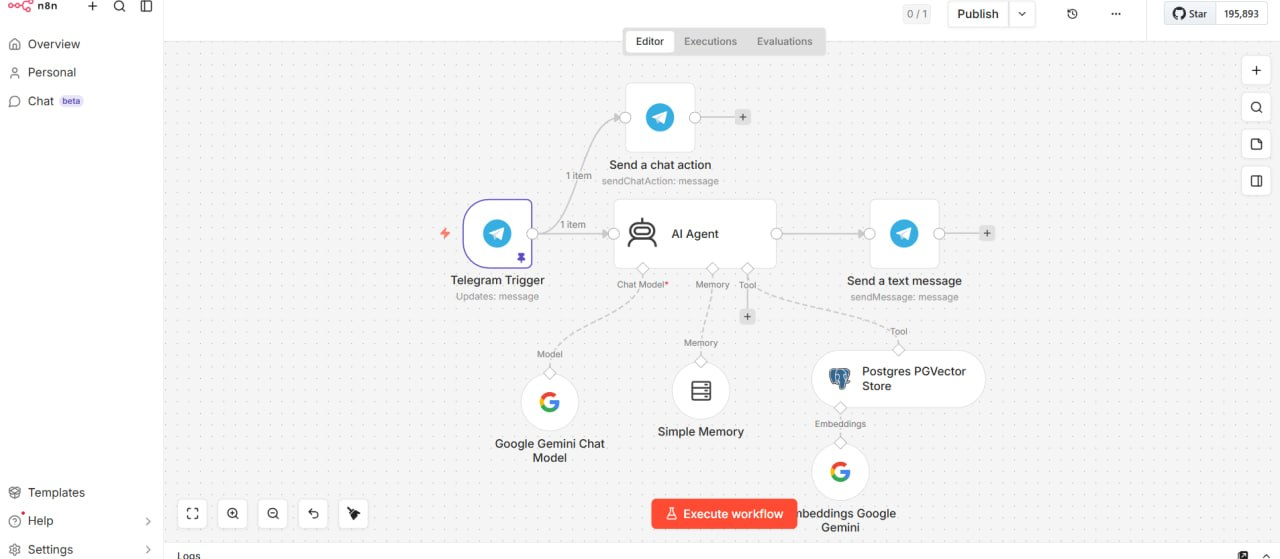
AI handles the dialogue and phrases recommendations, but it pulls product information from a controlled source. First, the system finds suitable products in the catalog, and only then does AI turn the search results into a clear recommendation.
If the right product isn't available, the bot doesn't make up an alternative. It can clarify the request, suggest a different search option, or say that no suitable products were found.
Technical note: the user's answers are converted into structured parameters, which the system uses to search for products in the catalog. Google Sheets stores the name, category, specifications, age groups, size or weight, special needs, description, and a link to the product. Some parameters are required; the rest are used as needed.
Part of the consultation process that used to require a manager has moved to an automated workflow. The business can provide consultations 24/7 and scale them without a proportional increase in team size, while managers focus on more complex inquiries.
A similar architecture can be used to select cosmetics, electronics, or clothing; recommend courses in education or pricing plans in SaaS; or handle support requests initially.
NPS survey responses in eSputnik are stored under technical IDs, and multiple-choice answers are stored as a bitmask. To a marketer, this looks like a set of numeric values, for example:
224468: 9
288660: 1011
To use this data in analytics, you need to decode the answers, rename the fields, and bring all the surveys to a single structure.
After a survey is completed, eSputnik triggers a scenario with a Webhook block. A Velocity template replaces the technical IDs with clear field names and decodes the bitmasks.
As a result, the external system receives data that is already prepared for analysis, in JSON format.
{
"nps_recommend": "9",
"interesting_useful": "Competitor comparison; Growth strategy; Forecast of future performance"
}
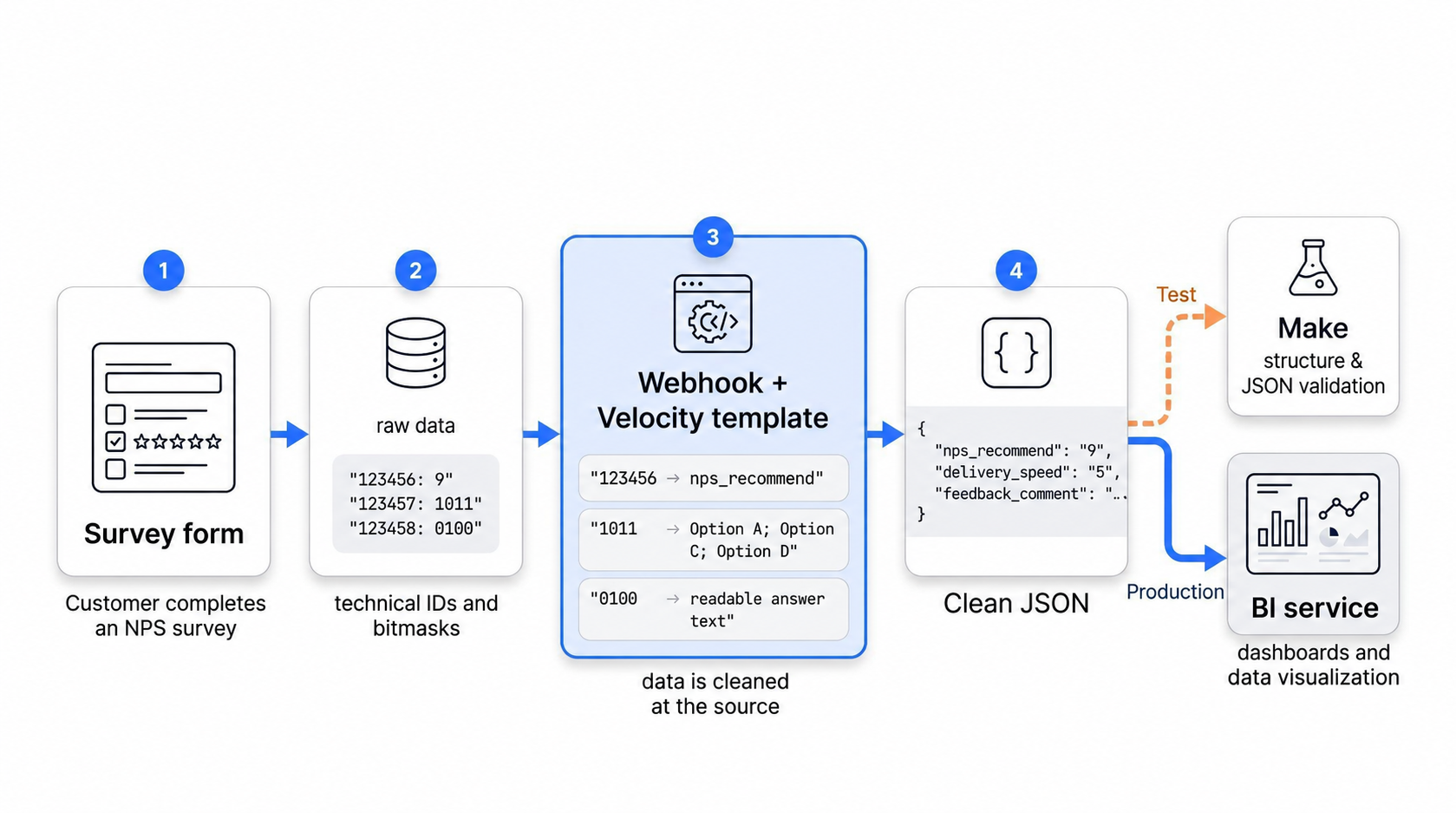
We first tested the webhook through Make: we checked the data structure and JSON validity. After that, we passed the data to a BI service, where we built an NPS dashboard.
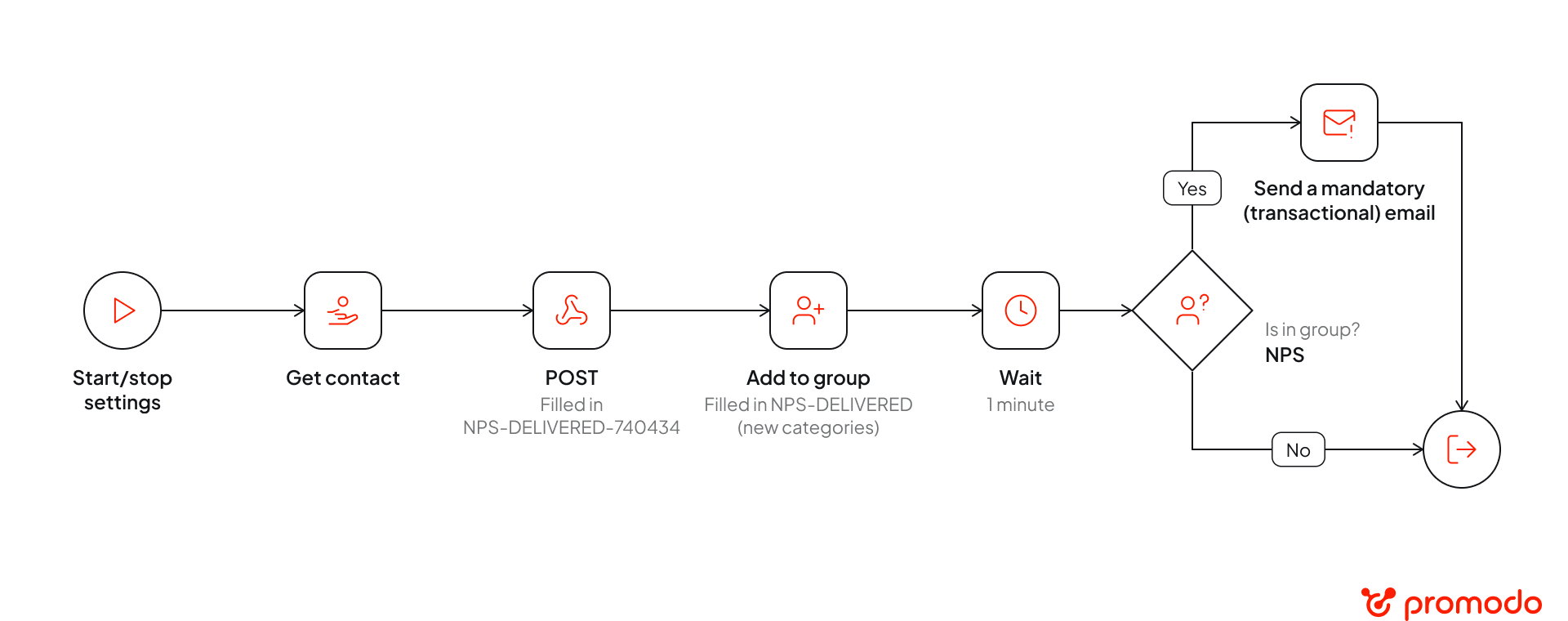
Before automation, this took hours of manual work every month: exporting the data, renaming columns, decoding masks, and merging everything into one spreadsheet. Now that step is gone.
Technical note: the mask 1011 means the user selected the first, third, and fourth answer options. A Velocity template uses #if/#elseif conditions to check each position and insert the corresponding text.
The same question in different surveys may have a different profileInputId, but in the JSON it gets the same key. This allows responses from different surveys to be combined in a single dashboard.
It's important to keep in mind that the order of zeros and ones in the mask corresponds to the order of options in the form. If you change the form, you need to update the template as well. Also, BI services usually don't accept webhooks directly, so you need an intermediate layer that writes the JSON to a table.
In all five scenarios, n8n and Make play a similar role: they receive data from one source, process it according to set logic, and pass the result to another system.
The architecture is very similar, too. At the center is a workflow that receives data, applies certain logic, and passes the result on.
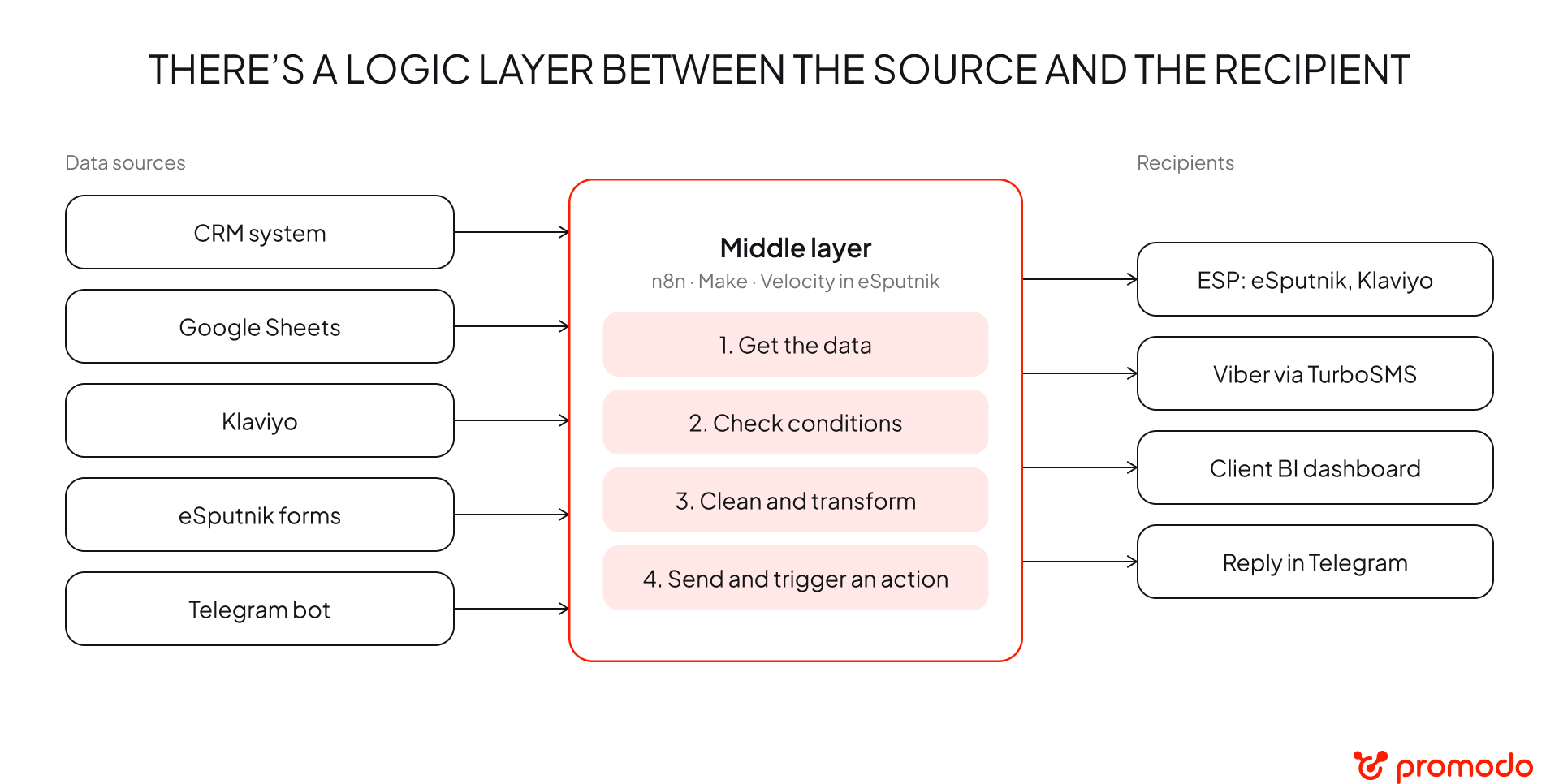
That's why n8n or Make is best seen not as an "integration service" but as middle layer between marketing systems. It can validate, clean, and merge data from multiple sources, choose the right branch of a scenario, pass an event to another system, and trigger the next action.
And, importantly, you don't have to start every new integration from scratch. You can connect a new survey, status, or contact source using the same template.
Unfortunately, we don't have good news for you here.
No-code and low-code work well when you need to quickly automate a clear process, connect several services, or add logic between them. But the more complex the business logic and the larger the volumes, the more important architecture, error control, and maintenance become — and that's when you should bring in a developer.
The most common mistake is in data mapping. The rule is simple: test, test, and test again; dive into the user journey; and look for non-obvious edge cases.
A workflow should anticipate the following in advance:
AI scenarios come with an additional condition: if the consultation is complex or a mistake could be costly for the business, a hybrid approach is better. The bot collects and structures the information, and a manager makes the decision.
We also don't recommend automating a process just because it's technically possible. If an operation happens once a month and takes a few minutes, building a complex workflow may not pay off the time invested.
In our experience, n8n has broader functionality and Community Nodes for non-standard tasks, but it can be more expensive for small sending volumes.
Make lets you get started faster thanks to ready-made connectors that update automatically.
We didn't choose Zapier because it's harder to work with arrays, and implementing the same tasks takes more steps and costs more.
But even if there's no ready-made module for the service you need, you can use universal tools: HTTP requests to the API, webhooks, and working with JSON.
Good automation isn't about the number of integrations or how many blocks you managed to add to a workflow. Its value is that the team stops doing repetitive tasks manually and can spend more time on tasks that require human involvement.
In our examples, these are automatic contact transfer, passing data from a CRM, connecting an additional communication channel, personalized consultations, and preparing NPS data for analytics. And in every case, the logic is similar.
This is how marketing process automation reduces routine tasks and brings order to data work.
You may also like
Choose quality and trusted services to improve the presence of your company on the Internet, and feel free to contact our UK team if you have any questions.

We’ll explore 14 effective car dealership marketing strategies to help strengthen your online presence, attract qualified leads, and ultimately increase sales.

Understand why just having a website isn’t enough, and how you can grow your practice using healthcare Search Engine Optimization.

A prominent ranking is critical while some 34.2% of users click on the top organic result on Google.
We at Promodo are ready to help you improve your performance across all digital marketing channels.
Get started