Content



Team Lead of Content for promodo.com
Experienced in working with data, expert recommendations, and real business cases to create clear, valuable content that delivers real business impact. Passionate about discovering new insights, exploring industry trends, and turning complex topics into practical, easy-to-understand content.
SEO Certified by Promodo Academy, with certifications in Content Marketing and Digital Marketing from HubSpot, and the Semrush Social Media Toolkit Exam completed.





GA4 shows where users come from, how they interact with your website, and what actions they take. Your CRM records leads, orders, payments, and actual sales. That is why conversion counts and revenue in the two systems rarely match.
A GA4 vs CRM data discrepancy doesn't necessarily mean your tracking is broken. GA4 and CRM collect and process data on different principles. The numbers are also affected by ad blockers, cookie consent settings, duplicate events, returns, and attribution models.
The real problem starts when a business uses this data to evaluate marketing without understanding why the numbers differ. Then it's hard to see which channels actually perform and how to allocate the ad budget.
In this article, we explain how GA4 and CRM data differ, how to find the cause of the mismatch, and which tools help reconcile analytics with real sales. In our projects, these tools brought GA4 and CRM data to a 99% match.
Before looking for the causes of discrepancies, you need to understand what exactly each system records.
Google Analytics 4 (GA4) is a web and product analytics platform. It collects data on how users interact with a website or app: traffic sources, page views, clicks, form submissions, purchases, and other events.
In GA4, you can see:
GA4 helps you compare marketing channels within a single system. For example, you can evaluate traffic from organic search, paid ads, direct visits, referrals, and AI assistants.
At the same time, ad platforms have their own attribution systems. Google Ads and Meta Ads may credit conversions by different rules. GA4 lets you analyze channels in a single model, but its numbers also depend on how data collection is set up.
A CRM (Customer Relationship Management) system manages customer interactions, sales, and orders. HubSpot, Salesforce, Zoho, and Pipedrive are common examples.
Unlike GA4, a CRM stores information about specific customers and the outcome of each deal. Depending on the setup, it can record:
A CRM can hold sales data from many channels: the website, phone calls, offline stores, or sales managers. But that data has to be sent to the system or entered manually.
On its own, a CRM usually doesn't know which pages a user viewed before submitting a lead. To connect a sale with an ad channel and the customer's path on the site, you need an analytics integration that correctly passes identifiers and traffic sources.
In short, GA4 helps you analyze user behavior and marketing channels, while a CRM tracks leads and actual sales. The two systems complement each other, but they shouldn't be expected to show identical numbers.
Discrepancies come from both technical settings and differences in how orders are counted. Here are the main causes.
AdBlock, browser privacy settings, and mechanisms like Safari Intelligent Tracking Prevention (ITP) can limit the data sent to analytics.
As a result, GA4 misses some events even though the user actually submitted a lead or made a purchase. If the order reached the CRM, it will still count as a sale.
If a user rejects analytics cookies, GA4 may not receive full data about their behavior. For businesses in the EU and UK, this effect is especially strong because of GDPR consent requirements.
With Consent Mode v2 set up correctly, GA4 can use behavioral modeling to estimate part of the missing data based on users who gave consent. This is a statistical estimate, not a recovery of actual events from a specific user.
Meanwhile, the CRM can still record a lead or order if the user shared their contact details and the business has a lawful basis to process them. So even when both systems work correctly, their numbers can differ.
If the purchase event is set up incorrectly, GA4 may count one transaction several times. This happens, for example, when the order confirmation page reloads or a tag fires on several triggers.
To reduce the risk of duplicates, send a unique transaction_id with every purchase and check how the system handles repeated events.
It's also important to verify your ecommerce events: whether purchase value, currency, items, and other required parameters are passed.
GA4 records an event when it happens. If a user clicks the form submit button, the system may count a conversion even if the lead turns out to be a test or spam. In the CRM, a manager can change the status of such a lead or remove it from the pipeline.
The same goes for orders. GA4 may record a purchase at checkout, while the CRM later shows that the order was canceled, unpaid, or returned.
To compare the numbers correctly, define what your business counts as a sale: a placed order, a confirmed order, a paid purchase, or a closed deal.
GA4 and CRM may assign the same transaction to different dates.
For example, GA4 records a purchase at checkout, while the CRM records it at payment. If the customer paid the next day, your reports by calendar date will show a discrepancy.
Also check the time zone settings and currency conversion rules in both systems. If GA4 and the CRM use different time zones or convert currency differently, revenue and transaction counts for specific periods won't match.
Another cause of discrepancies is the rules each system uses to assign a conversion source.
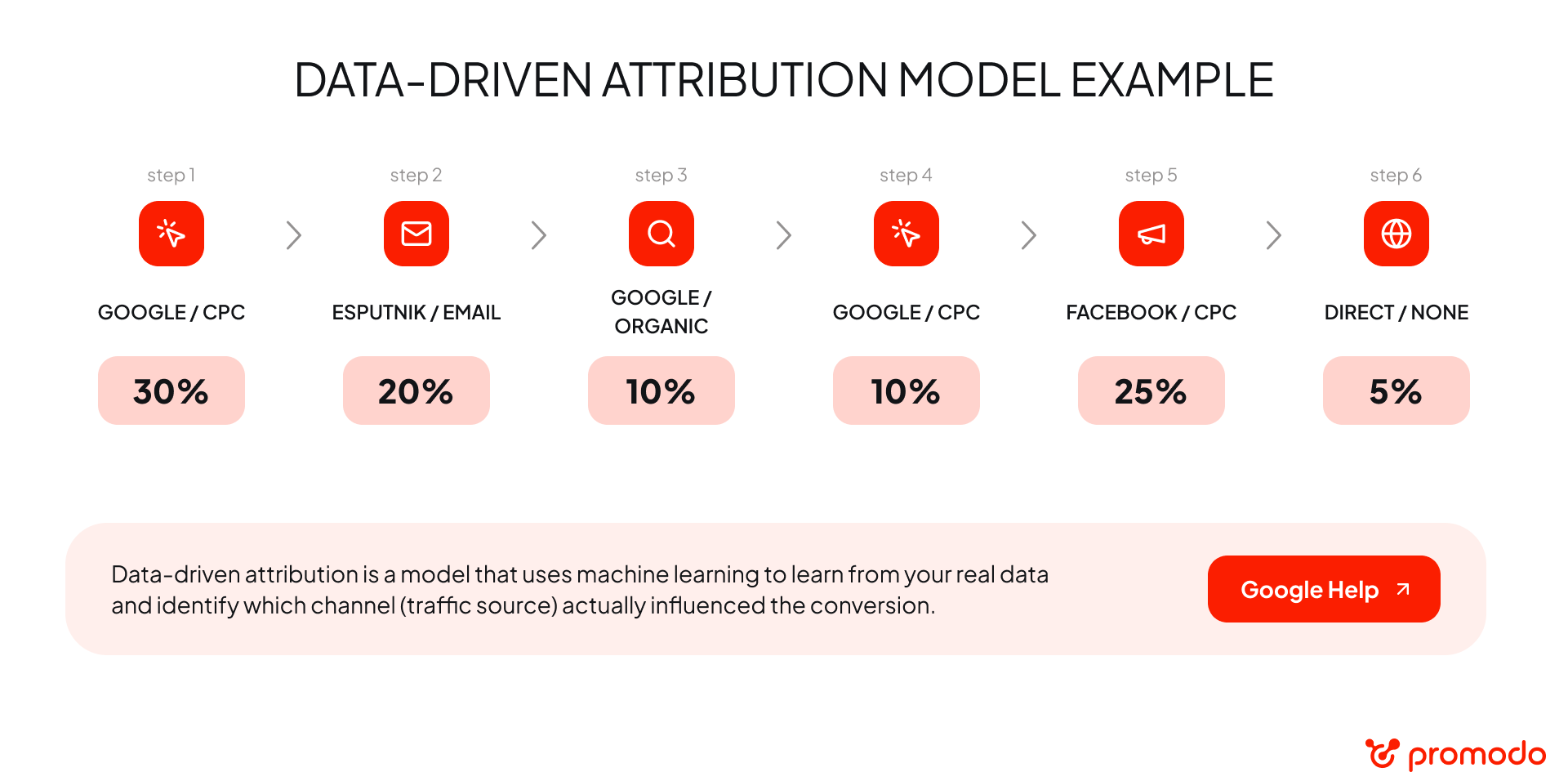
GA4 uses data-driven attribution (DDA) in its attribution reports. It distributes conversion credit across a user's touchpoints with marketing channels.
In a CRM, the sale source is often defined by a simpler rule, such as last non-direct click or last paid click. In that case, the whole sale is credited to one channel, and earlier interactions are ignored.
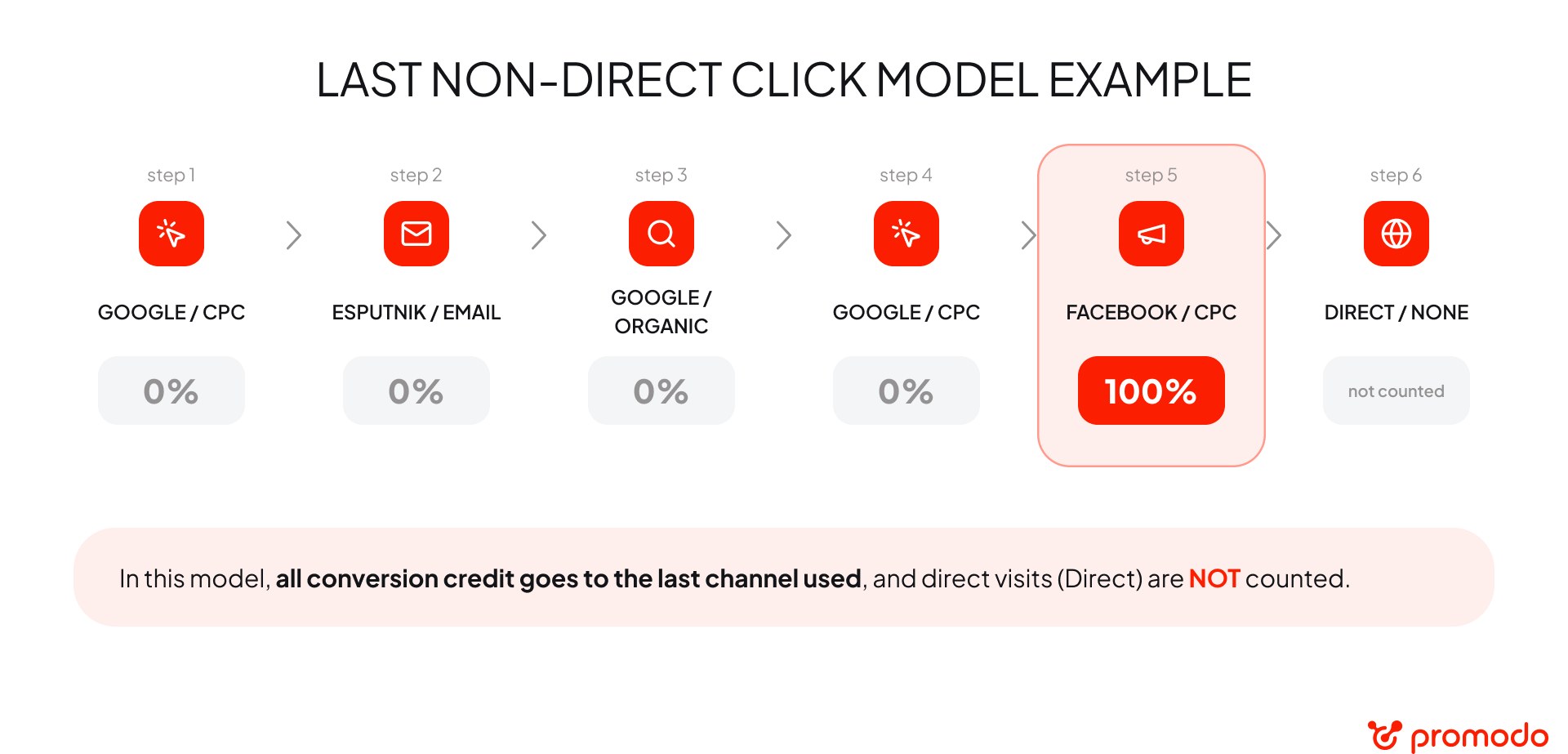
That's why GA4 and the CRM can show different conversions by channel even when the total number of orders matches.
"We recommend using GA4 to compare marketing channels. Mid-size and large businesses should also consider BI reports with complete data for deeper analysis and decision-making."
— Anna Kuts, Head of Analytics at Promodo
For a quick first check, try our Digital Analytics Health Checker. For a deeper review of tracking and ecommerce events, order a GA4 audit.
The right solution depends on which data is lost and what the business uses analytics for. Use Measurement Protocol to send sales data, server-side GTM to change your data collection architecture, and end-to-end analytics to analyze marketing against actual revenue.
Let's look at each solution in more detail.
Measurement Protocol is a GA4 tool that lets you send events directly from a server, not only from the user's browser.
For example, when your CRM or backend records a successful payment, it can send a purchase event with the relevant parameters to GA4. This helps capture sales that the browser tag missed.
The process usually includes several steps:
"After implementing Measurement Protocol, our projects reached a 99% match in conversion and revenue data between GA4 and the CRM. This makes it possible to evaluate ad campaigns more accurately and make decisions based on more complete data."
— Anna Kuts, Head of Analytics at Promodo
Keep the limitation in mind: sending a purchase from the backend doesn't, by itself, restore all user behavior data. To connect a sale with its traffic source, device, or earlier interactions, you need the right identifiers (such as client_id) and a correct integration with analytics data.
In a standard Google Tag Manager (GTM) setup, some tags fire in the user's browser. Server-side GTM moves part of data processing and transfer to a server.
This gives you more control over the data flow and can reduce losses caused by browser restrictions. Server-side processing also lets you control what data goes to third-party services and remove personal information before it is sent.
A typical architecture may include:
For example, when the CRM changes an order status to "Paid" or "Refunded," a webhook can pass this to the server infrastructure. The system then processes the event and sends it to GA4 according to the integration settings.
After implementation, check that events aren't duplicated, that amounts and statuses are passed correctly, and that transactions can be matched between GA4 and the CRM.
"In Promodo projects, server-side GTM reduced the discrepancy between the systems to 3–5%."
— Anna Kuts, Head of Analytics at Promodo
The timeline depends on project complexity and developer availability. In one project, implementation took up to nine months because of the task queue on the development side.
Measurement Protocol and server-side GTM improve data transfer. But if your business needs to evaluate not just conversions but actual revenue by ad channel, consider end-to-end analytics (also called closed-loop reporting).
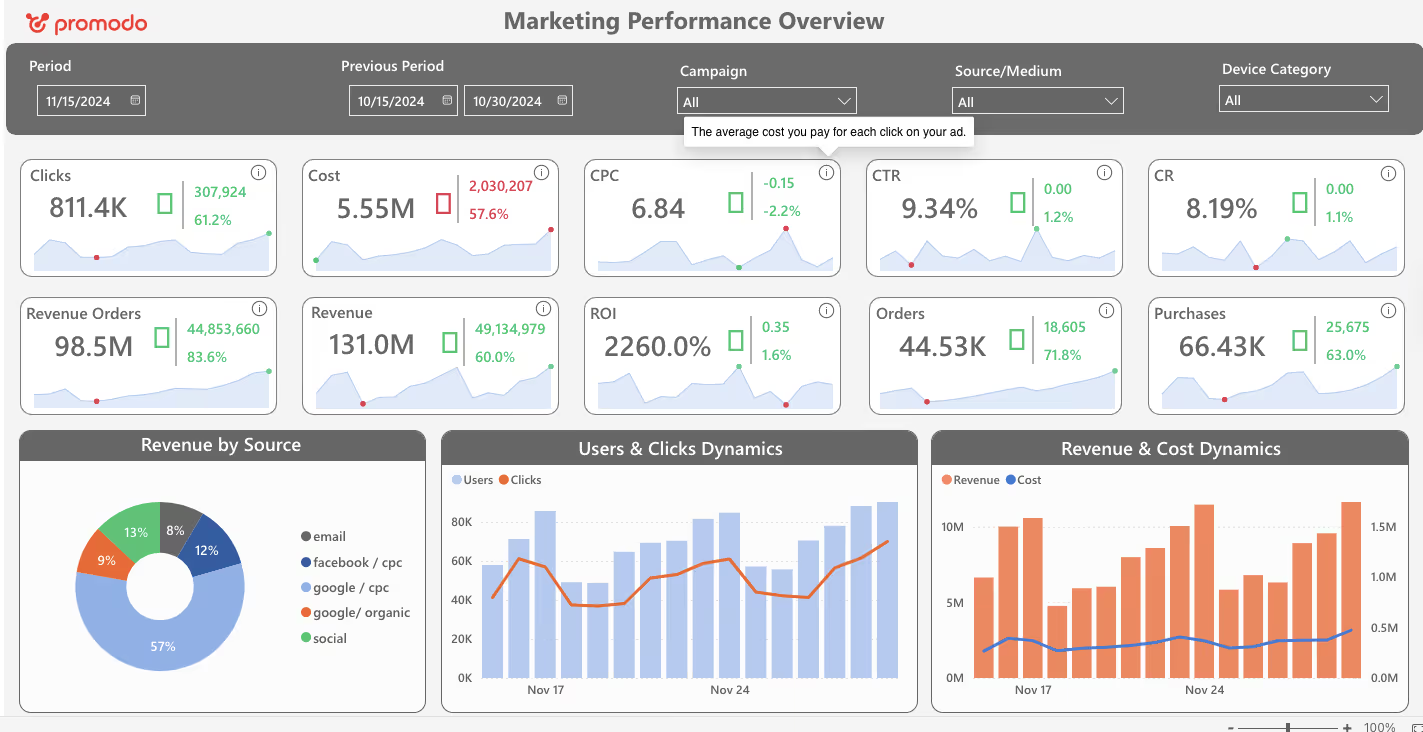
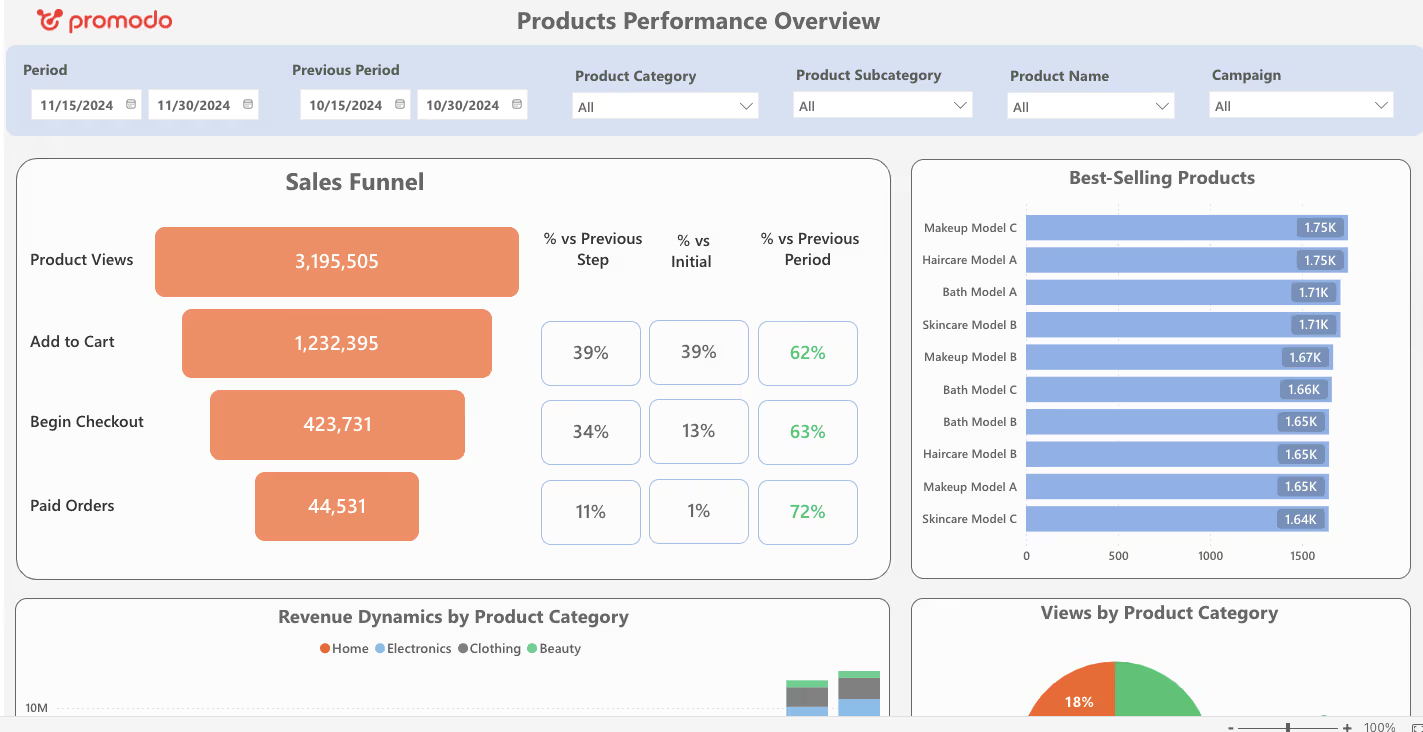
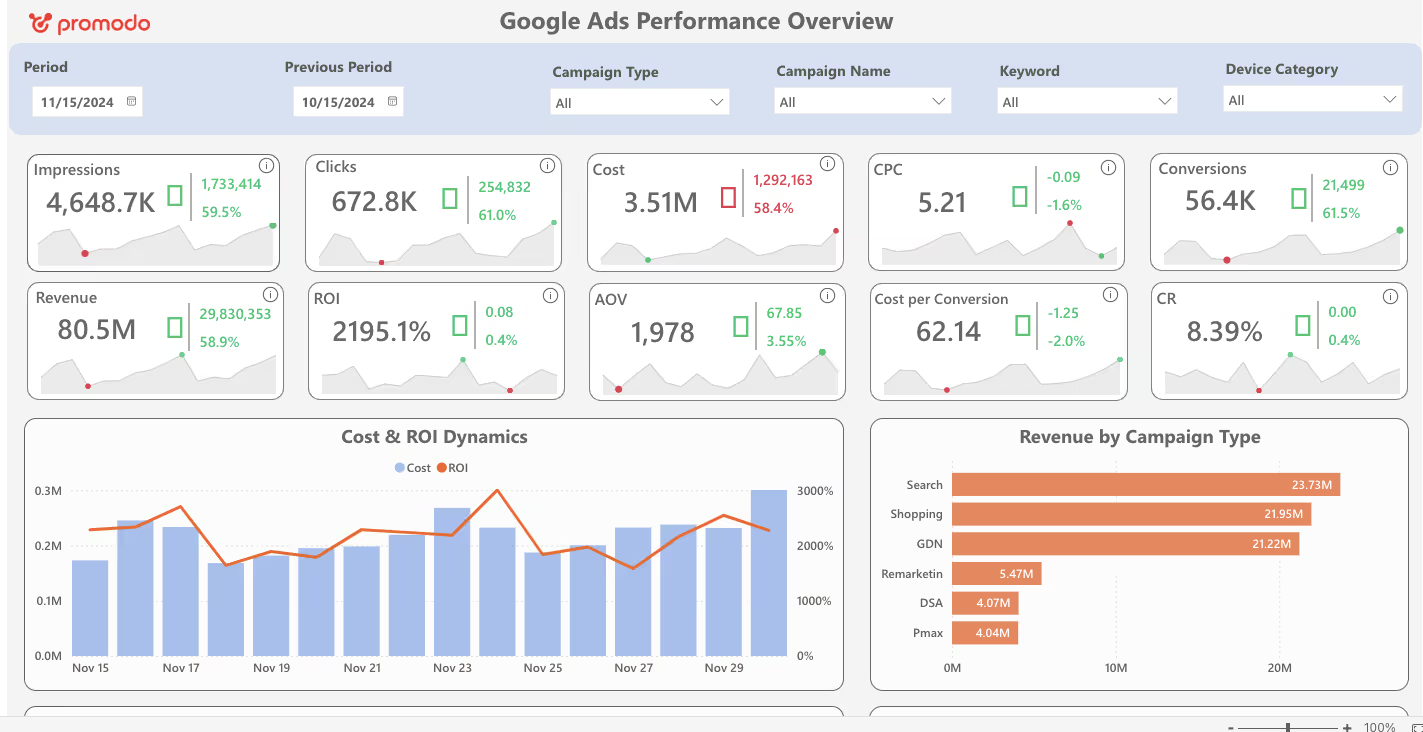
It combines data from ad platforms, GA4, and the CRM in one environment. This lets you match ad spend with real sales and evaluate campaigns by business metrics such as ROAS and ROI.
A typical architecture includes:
As a result, the business gets a report that shows not only the number of leads or purchases but also revenue, costs, and other metrics based on actual CRM statuses.
To launch the project, the team needs access to ad accounts, GA4, and the CRM, a list of business metrics to track, and an agreed structure for the future report. Then integrations are set up, data accuracy is checked, and automatic updates are launched.
Want to see end-to-end analytics in action? Try Promodo's demo dashboard: ad spend, channels, and CRM sales in one report.
[[SLIDER-START]]
[[SLIDER-END]]
"Investment in such projects averages $15,000–20,000. These solutions are mostly relevant for mid-size and large businesses that regularly analyze marketing spend and match it against actual sales results."
— Anna Kuts, Head of Analytics at Promodo
Before implementing end-to-end analytics, the client saw Facebook among the top-performing channels in its reports. But some reports contained sampled data, which made it hard to assess each channel's real contribution.
After combining data from ad platforms, GA4, and the CRM, the team got a fuller picture. In the report based on complete data, Facebook dropped from first to fourth place in performance.
This changed how the client evaluates channels: decisions could now be based on matched data rather than the numbers of a single system.
For an automotive marketplace, the Promodo team first set up GA4 and then implemented end-to-end analytics.
The solution combined marketing channel data with the CRM and allowed ad performance to be analyzed in more detail. In particular, the client could evaluate results by individual dealer and car brand.
Previously, this analysis required separate reports and waiting for them to update. Now the data is available in a single report that updates automatically.
See another example in our case study: how end-to-end analytics accelerated marketing decisions for Zakaz.ua.
GA4 and the CRM show different parts of the customer journey. To evaluate marketing performance, it's not enough to see the number of conversions: you need to know how many turned into real sales and how much revenue they brought.
At Promodo, we help businesses solve complex analytics challenges. We'll help you connect marketing data with actual sales so you can evaluate campaigns more accurately and allocate budget with confidence.
Have a Tricky Analytics Question?
We know how to solve it.
Contact Us
[[FAQ-START]]
The systems may record the moment and status of a purchase differently. GA4 can count a checkout event, while the CRM counts only paid or confirmed sales. Ad blockers, cookie consent settings, duplicate events, and integration errors also affect the gap.
There is no universal percentage that counts as normal for every website, and these systems were never built to match exactly. It depends on traffic sources, analytics setup, business type, how sales are recorded, and how complete the integration is. First, check that you are comparing the same metrics in both systems.
Use Measurement Protocol. It lets you send events from the backend to GA4, for example, after an order status changes to "Paid." For accurate matching, pass the required transaction parameters and avoid duplicate events.
Yes. Alternatives include Matomo, Amplitude, and Mixpanel. The choice depends on your business goals, the depth of product analytics you need, data storage requirements, and budget. But replacing GA4 won't fix CRM discrepancies by itself if the cause lies in the integration or in different sales-counting rules.
[[FAQ-END]]
Team Lead of Content for promodo.com
Experienced in working with data, expert recommendations, and real business cases to create clear, valuable content that delivers real business impact. Passionate about discovering new insights, exploring industry trends, and turning complex topics into practical, easy-to-understand content.
SEO Certified by Promodo Academy, with certifications in Content Marketing and Digital Marketing from HubSpot, and the Semrush Social Media Toolkit Exam completed.
You may also like
Choose quality and trusted services to improve the presence of your company on the Internet, and feel free to contact our UK team if you have any questions.

Sarch engine optimization (SEO) tools will help you elevate website performance on SERPs.

Our team has gathered practical AI use cases that help online stores sell more.

The global revenue of the car rental market is estimated at $100 b. The niche shows a stable annual growth rate of 2.99% by 2027.
We at Promodo are ready to help you improve your performance across all digital marketing channels.
Get started